VFRGENERAL AVIATIONIOS + ANDROID
VFR navigation that flies the whole route.
Plan the route and take it offline. Fly it with the next checkpoint and nearby airports in view. Land with a logbook draft ready to review.
- Coming soon to the App Store
- Coming soon to Google Play
For iPhone and iPad, and Android phones and tablets.
ClearProp is a supplemental aid, not a primary means of navigation. The pilot in command stays responsible. Read the disclaimer


IPAD AND TABLETS
Bigger screen, same cockpit flow.
Plenty of pilots fly with an iPad on the yoke or kneeboard, so ClearProp gives it a real landscape layout. In flight, course, distance, ground speed and altitude sit in a column beside a full-size map. The same app runs on iPhone, and on Android phones and tablets.
- Landscape layouts
- Flight data beside the map
- Route editor docked beside the map

iPad screenshots with sample data. Map data: Protomaps Basemap; OpenStreetMap contributors · Mapterhorn terrain. ClearProp is a supplemental aid, not a primary means of navigation. The pilot in command stays responsible.
ONE FLIGHT, START TO FINISH
From route planning to the logbook, in one app.
ClearProp follows a VFR flight the way you fly it: plan, fly, divert if you need to, then log it.
01 / PLAN
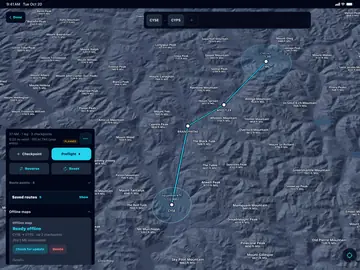
Plan the route. Take it offline.
Build a general aviation route with airports and named checkpoints. Before departure, ClearProp downloads the map data for that route, so it is ready when the signal is not.
- Route planning
- Named checkpoints
- Offline maps per route
iOS screenshot. Map data: Protomaps Basemap; OpenStreetMap contributors · Mapterhorn terrain
02 / FLY
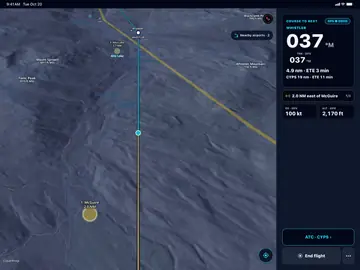
Keep the next checkpoint in view.
In active navigation you see course, distance and time to the next checkpoint, ground speed and altitude, and your own checkpoint notes when they become relevant.
- Course and distance
- ETE to the next checkpoint
- Pilot-entered notes
iOS screenshot. Map data: Protomaps Basemap; OpenStreetMap contributors · Mapterhorn terrain
03 / DIVERT
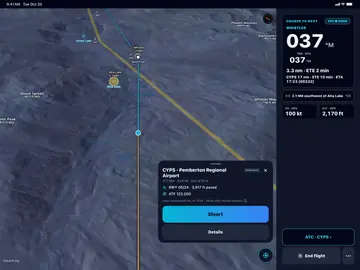
Know your nearby airport options.
Nearby airport and facility awareness supports diversion thinking and orientation. It does not replace current charts, official airport data or your judgment.
- Nearby airports
- Diversion awareness
- Facility context
iOS screenshot. Map data: Protomaps Basemap; OpenStreetMap contributors · Mapterhorn terrain
04 / LOG
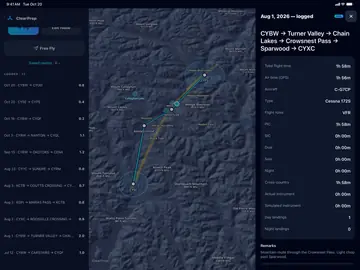
Land with a logbook draft.
When you end the flight, ClearProp prepares a logbook draft from the session. You review and edit every entry before anything becomes part of your record.
- Prefilled from the flight
- Marked needs review
- You submit it
iOS screenshot. Map data: Protomaps Basemap; OpenStreetMap contributors · Mapterhorn terrain


SYSTEM STATUS
Check the board before you go.
The services behind ClearProp, live. The board refreshes about once a minute, and we record the history every 6 hours. If a check fails or we cannot reach a service, the board says so instead of guessing. See the full status page.
- ON TIME
- Working normally
- DELAYED
- Slow, or a check just failed
- DIVERTED
- Partly down
- CANCELLED
- Down
- CHECK STATUS
- We could not confirm it
| SYSTEM | GATE | REMARKS |
|---|---|---|
| Web app, API and database | API | CHECK STATUS |
| Account sign-in | IDP | CHECK STATUS |
| Offline map downloads | CDN | CHECK STATUS |
| Over-the-air app updates | OTA | CHECK STATUS |
| Live base map (third-party provider) | EXT | CHECK STATUS |
SAFETY
A supplemental aid. You fly the aircraft.
Fly the aircraft first. Set up ClearProp before you fly, and only look at or interact with it when it is safe to do so.
Read the full aviation disclaimerSUPPLEMENTAL AID ONLY
ClearProp is a supplemental situational-awareness and planning aid. It is not approved or certified by Transport Canada, the FAA, EASA or any other aviation authority.
ClearProp is not for primary navigation. Do not rely on it for navigation, terrain or obstacle clearance, traffic avoidance, weather assessment, or airspace compliance.
It does not replace official charts and publications, approved navigation equipment, your procedures and preflight planning, air traffic control instructions, or your own judgment.
The pilot in command remains solely responsible for the safe conduct of the flight, for preflight planning, and for complying with all regulations and air traffic control instructions. Nothing in ClearProp changes that.
DATA CURRENCY
- Airport, airspace, frequency and procedure information may be incomplete, delayed or out of date, especially offline data you downloaded earlier.
- GPS position, ground speed and altitude shown by your phone can be inaccurate or lost, and your phone can overheat or run out of battery.
- Logbook drafts are prefilled from recorded data. Review every entry before you save it.
PLANS
Navigate free. Go Pro for your whole logbook.
Prices in USD. Pro is bought in the app (App Store or Google Play) or on the web from your account page.
Free
Freeforever
Navigate and log every flight. No card needed.
- Moving map navigation with checkpoint guidance
- Automatic flight logging
- Canada Flight Supplement airport and frequency lookup
- MF and ATF area alerts with the frequency to use
- Radio calls for your planned route
- Overflight calls for MF and ATF areas on your route
- Offline maps for one route at a time
- Your last 30 days in the logbook, with older flights kept for Pro
- Fuel left at every checkpoint and what you land with
- A warning when a route needs more fuel than your tanks hold
- The start check judges each leg between fuel stops on its own
- In flight, each fuel stop is a landing and the land-by time restarts after it
- Weight and balance says within limits only after you enter people and bags
- Keep your squawk code, clearance and notes on screen in flight
- Your flight notes stay with the flight, so you can read them after you land
Pro
$12.99/month
or $99/year
Every new account starts with 30 days of Pro, free.
- Everything in Free, plus:
- Offline maps for every saved route, with the map for your planned route saved automatically on Wi-Fi
- Your full flight history
- Export your logbook as CSV
- The flown track of each logged flight on the map
- Airport procedure packs: published circuit and procedure remarks, with citations
- AI route builder: describe a VFR flight and review the drafted route
- Get up to 3 AI route options to choose from
- AI drafts check fuel and winds and add fuel stops
- Preflight assistant for weight and balance and fuel
- POH photo import
- Progress toward your next licence or certificate in the logbook
- In flight, the time to land with your reserve intact
- Fuel and a land-by time for each leg between fuel stops
- US forecast winds in the nav log and AI fuel checks
- AI drafts keep out of prohibited areas, flag towers to call and the DC special flight rules
- AI drafts use the published circuit, noise and PPR notes of every airport
- Every US AI draft warns first when it enters the DC special flight rules area or restricted zone
- The AI route builder never drafts a route into the Washington DC restricted zone
- AI drafts name published VFR routes and flyways near your route, and use a current one when it clearly fits
- Canadian VFR terminal procedures, CFA and transit routes, and restricted and advisory airspace
- Canadian VFR routes built from coordinates as flyable lines of waypoints
- AI draft notes stay in Preflight after Use route
- The assistant can quote published limits for more aircraft, with the source
- US airspace on the map, with floors and ceilings
- The current ATIS for Canadian and US airports
LIMITED TIME
Founding Pro
was $99, now $69/yearLocked in for as long as you stay subscribed
Limited time: a full year of Pro for $69, for the first 500 pilots.
- Everything in Pro
- $69/year for as long as you stay subscribed
- Limited to the first 500 pilots
Questions about plans? See the pricing FAQ.
What is ClearProp?
ClearProp is a VFR navigation app for general aviation pilots on iPhone and Android. It connects route planning, offline maps for the route, active navigation with checkpoint guidance, nearby airport awareness and a logbook draft you review.
Who is ClearProp for?
ClearProp is for general aviation pilots flying VFR in Canada and the United States. Offline maps cover Canada, the contiguous United States and Alaska, and logbook drafts support Transport Canada and FAA logbook formats.
When can I install ClearProp?
ClearProp is coming soon to the App Store and Google Play. The store badges on this page turn into install links as each store listing goes live.
Will a planned route work without a connection?
Yes, once its offline maps are downloaded. ClearProp prepares map coverage for the planned route while you are online, and shows you when a download is not complete before departure.
Does ClearProp replace charts or official flight information?
No. ClearProp is a supplemental aid, not a primary means of navigation. The pilot in command stays responsible. It is not approved or certified by Transport Canada, the FAA, EASA or any other aviation authority. It does not replace current official charts and publications, NOTAMs, weather briefings or your own judgment.
How does the logbook draft work?
When you end a flight, ClearProp prefills a logbook draft with the route and times it recorded. You review and edit the draft before you save it; nothing becomes part of your record on its own.
What does it cost?
Navigation and flight logging are free, with CFS airport and frequency lookup, MF and ATF area alerts, radio calls for your planned route, overflight calls for MF and ATF areas, offline maps for one route at a time, a logbook of your last 30 days, fuel left at every checkpoint and what you land with, a warning when a route needs more fuel than your tanks hold, a start check that judges each leg between fuel stops, fuel stops in flight, with a land-by time for each leg, a weight and balance that says within limits only after you enter people and bags, flight notes that keep your squawk code on screen in flight and flight notes kept with each logged flight. Pro is $12.99/month or $99/year and adds offline maps for every saved route, your full flight history, CSV logbook export, Flown track map, Airport procedure packs, the AI route builder, up to 3 AI route options to choose from, AI drafts that check fuel and winds and add fuel stops, a preflight assistant for weight and balance and fuel, POH photo import, progress toward your next licence or certificate, a live time to land with your reserve intact, fuel and a land-by time for each leg between fuel stops, US forecast winds in the nav log and AI fuel checks, AI drafts that name published VFR routes and flyways, Canadian VFR terminal procedures, CFA and transit routes, and restricted and advisory airspace, Canadian VFR routes built from coordinates, AI draft notes that stay in Preflight, published limits for more aircraft, airspace on the map, and the current ATIS for Canadian and US airports. Every new account starts with 30 days of Pro at no cost, and for a limited time the first 500 pilots can lock in Founding Pro at $69/year instead of $99/year.
CLEARED FOR TAKEOFF
Get the app
ClearProp is coming soon to iPhone and Android. The badges below turn into install links the day each store listing goes live.
- Coming soon to the App Store
- Coming soon to Google Play